Sales Ledger
The Sales Ledger is your central hub for managing all sales invoices. It provides a comprehensive list of all drafted, outstanding, and fully paid invoices, along with powerful filtering tools to help you manage your accounts receivable.
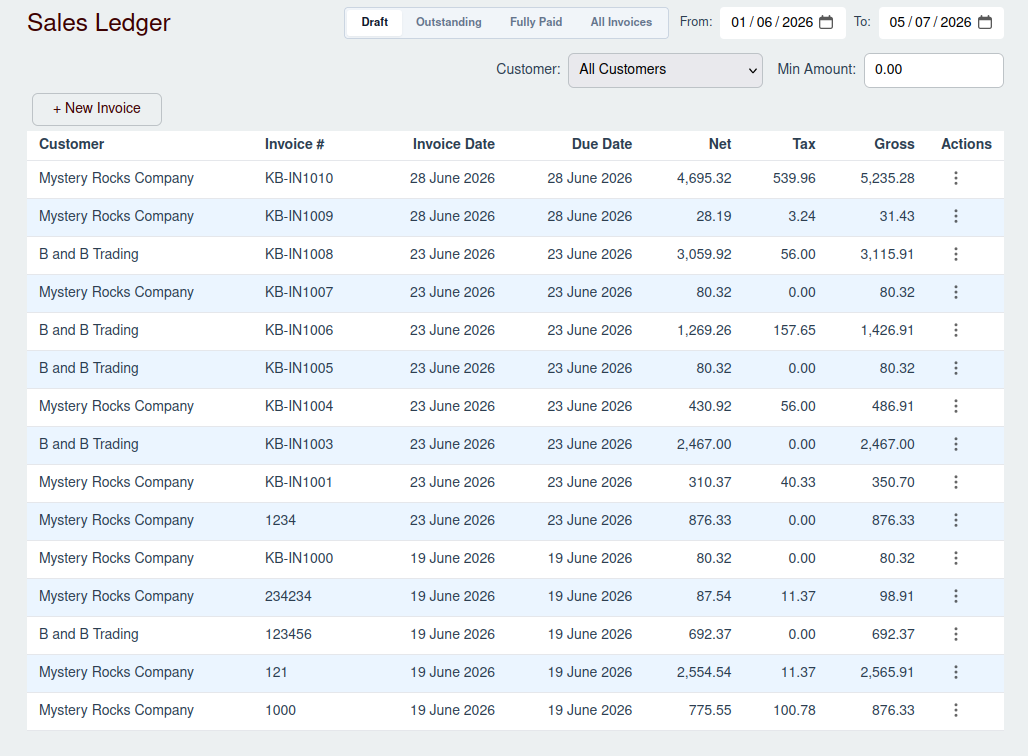
The Invoice List
The main feature of this page is the SalesInvoiceTable, which displays a list of all your sales invoices. The table
includes key information such as:
- Customer: The name of the customer the invoice is for.
- Invoice #: The unique number for the invoice.
- Invoice Date: The date the invoice was issued.
- Due Date: The date the payment is due.
- Net: The net amount of the invoice before tax.
- Tax: The tax amount applied to the invoice.
- Gross: The total amount of the invoice (Net + Tax).
Filtering Invoices
Above the invoice list, you'll find the Sales Invoice Filter. This tool allows you to narrow down the list of invoices based on several criteria:
- Status: Filter by "Draft," "Outstanding," "Fully Paid," or "All Invoices."
- Date Range: Specify a start and end date to see invoices within a certain period.
- Customer: View invoices for a specific customer.
- Min Amount: Set a minimum amount to find invoices at or above a certain value.
Managing Invoices
From the Sales Ledger, you can perform several actions:
Add a New Invoice
To create a new sales invoice, click the + New Invoice button.
- For detailed instructions, see the New Sales Invoice page.
View and Edit an Invoice
To view the full details of an invoice, edit its items, or record payments, click the action button (three dots) on the invoice row and select View. This will open the Sales Invoice Drawer.
- For more information, see the Managing a Sales Invoice page.