Editing a Partner
To edit an existing partner, click the Edit button in the "Actions" column of the partner you wish to change on the main Partner List page. This will open the "Partner Drawer," a side panel where you can manage all aspects of the partner.
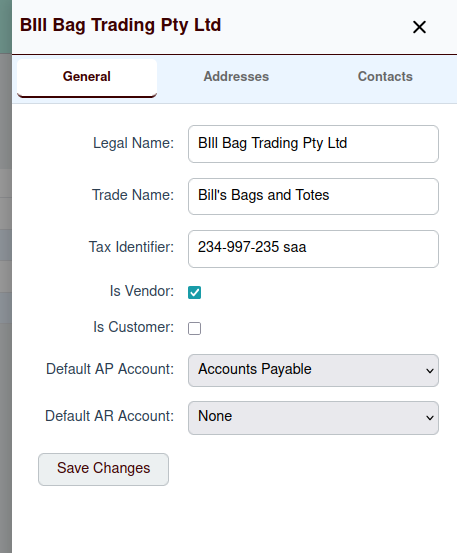
The Partner Drawer has three tabs:
- General: For the partner's main details.
- Addresses: For managing the partner's physical and mailing addresses.
- Contacts: For managing the people you interact with at the partner's organization.
General Tab
The "General" tab allows you to modify the same information you provided when you created the partner:
- Legal Name
- Trade Name
- Tax Identifier
- Is Vendor / Is Customer
- Default AP Account
- Default AR Account
Click the Save button at the bottom of the drawer to save any changes you make.
Addresses and Contacts
For information on managing a partner's addresses and contacts, please see the following pages: