Payables Ledger
The Payables Ledger is your central hub for managing all vendor invoices. It provides a comprehensive list of all outstanding and paid invoices, along with powerful filtering tools to help you stay on top of your liabilities.
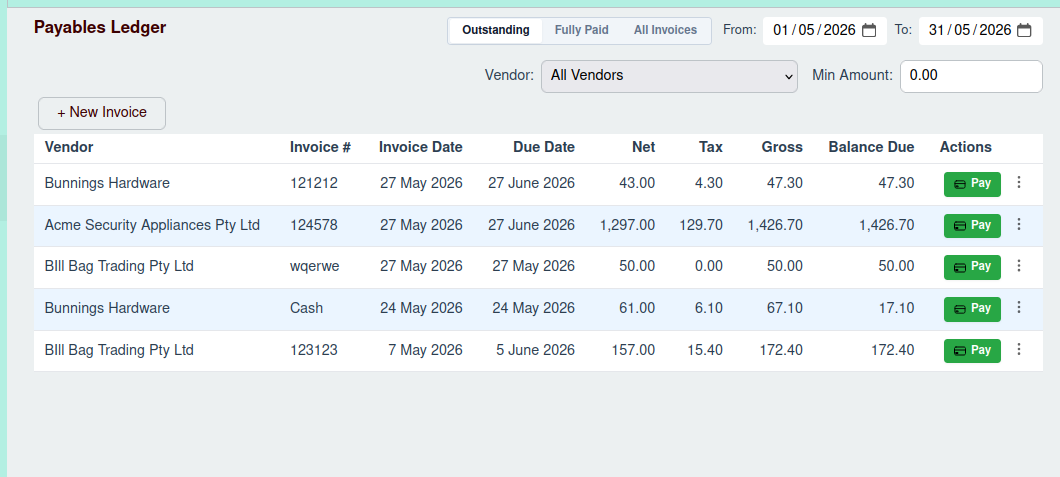
The Invoice List
The main feature of this page is the VendorInvoiceTable, which displays a list of all your vendor invoices. The table
includes key information such as:
- Invoice #: The unique number for the invoice.
- Vendor: The name of the vendor who sent the invoice.
- Invoice Date: The date the invoice was issued.
- Due Date: The date the payment is due.
- Amount: The total amount of the invoice.
- Balance Due: The outstanding amount yet to be paid.
Filtering Invoices
Above the invoice list, you'll find the Vendor Invoice Filter. This tool allows you to narrow down the list of invoices based on several criteria:
- Status: Filter by "Outstanding," "Fully Paid," or "All Invoices."
- Date Range: Specify a start and end date to see invoices within a certain period.
- Vendor: View invoices for a specific vendor.
- Amount: Set a minimum and maximum amount to find invoices within a certain value range.
Managing Invoices
From the Payables Ledger, you can perform several actions:
Add a New Invoice
To enter a new vendor invoice into the system, click the + New Invoice button.
- For detailed instructions, see the New Vendor Invoice page.
View and Pay an Invoice
To view the full details of an invoice or to make a payment, click on the invoice row in the table. This will open the Invoice Drawer.
- For more information, see the Managing a Vendor Invoice page.
Aged Payables Report
For a different perspective on your payables, you can view the Aged Payables report. This report groups your outstanding invoices by their age, helping you prioritize payments and manage your cash flow.
- To access this report, navigate to Payables -> Reports -> Aged Payables in the sidebar, or see the Aged Payables Report page.