Adding a New Partner
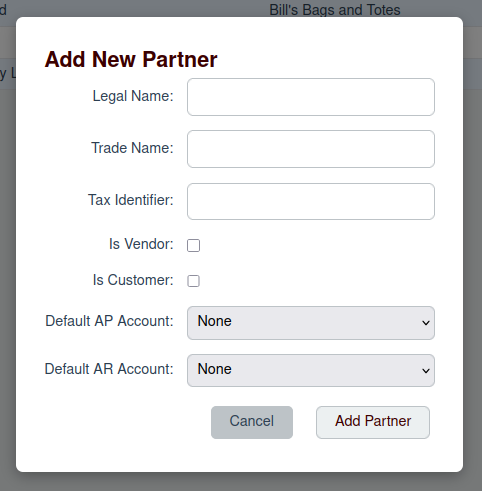
To add a new partner, you begin by clicking the Add Partner button on the main Partner List page. This will open the "Add New Partner" modal dialog.
Partner Fields
In the modal, you will need to fill in the following details for the new partner:
- Legal Name: The official, legal name of the partner.
- Trade Name: The name the partner does business as (optional).
- Tax Identifier: The partner's tax number, such as an ABN in Australia (optional).
- Is Vendor: Check this box if you purchase goods or services from this partner.
- Is Customer: Check this box if you sell goods or services to this partner.
- Default AP Account: The default Accounts Payable account to use for this vendor.
- Default AR Account: The default Accounts Receivable account to use for this customer.
Once you have filled in the details, click the Add Partner button to save the new partner.