Balance Sheet Report
The Balance Sheet is a financial statement that provides a snapshot of your company's financial health at a single point in time. It shows what your company owns (Assets), what it owes (Liabilities), and the owner's stake (Equity).
The fundamental accounting equation is always at the heart of the Balance Sheet: Assets = Liabilities + Equity
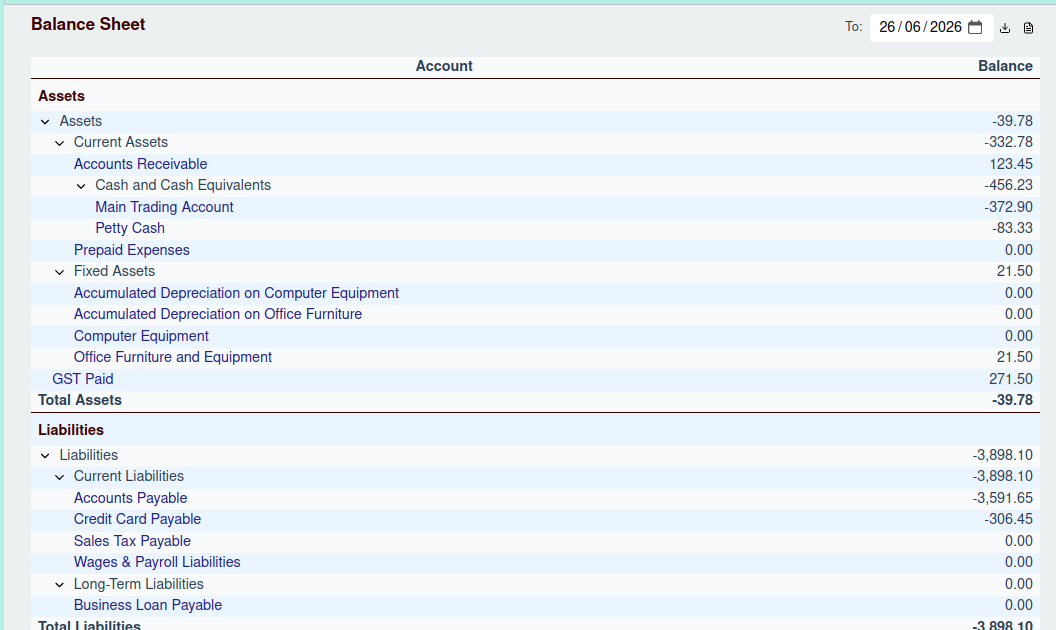
Generating the Report
To generate the report, select a date in the Report Options header. The report will show the balance of each account as of the end of that day.
Report Structure
The Balance Sheet is divided into three main sections:
1. Assets
This section lists all your asset accounts, such as bank accounts, accounts receivable, and inventory. It concludes with a Total Assets figure.
2. Liabilities
This section lists all your liability accounts, including accounts payable, loans, and accrued expenses. It concludes with a Total Liabilities figure.
3. Equity
This section lists your equity accounts, such as owner's capital and retained earnings. It also includes the Current Year Earnings (Net Income) calculated from your Profit & Loss statement. The section concludes with a Total Equity figure.
Like the other reports, the Balance Sheet is hierarchical. You can click the toggle button next to any parent account to expand or collapse it, and you can click on any non-group account name to navigate to that account's ledger.
The Balancing Act
The report finishes with a Total Liabilities & Equity figure. If your books are balanced, this number will be identical to your Total Assets.