Trial Balance Report
The Trial Balance is a report that lists all the accounts in your Chart of Accounts and their balances at a specific point in time. Its primary purpose is to ensure that the total debits equal the total credits, confirming the integrity of your ledger.
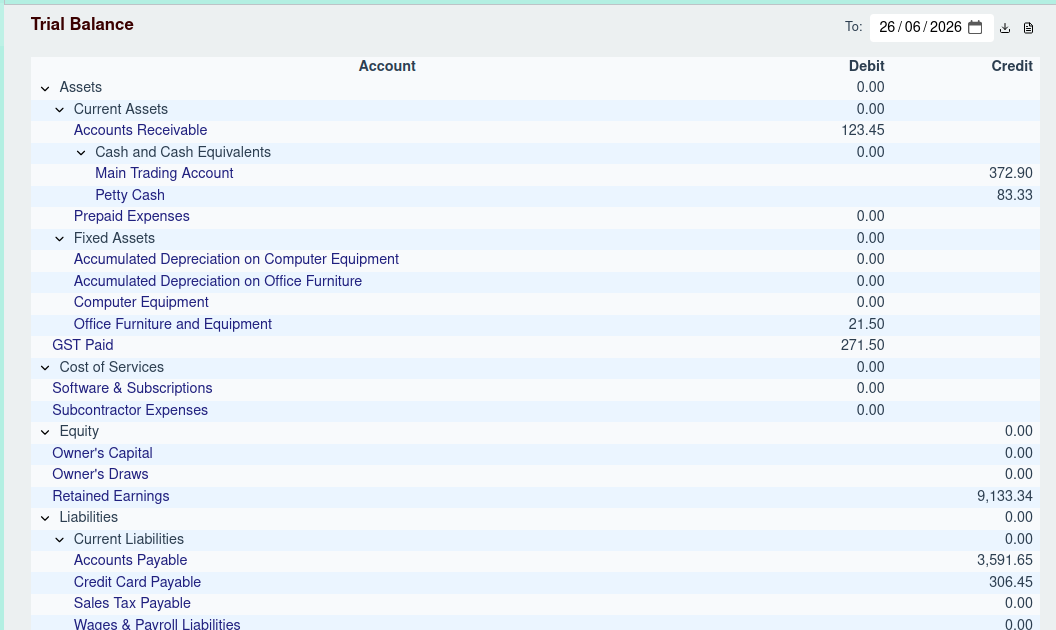
Generating the Report
To generate the report, select a date in the Report Options header. The report will show the balance of each account as of the end of that day.
Report Structure
The Trial Balance is a hierarchical report that mirrors the structure of your Chart of Accounts.
- Account: The name of the account. You can click on any non-group account name to navigate directly to that account's ledger.
- Debit: The balance of the account if it has a debit balance.
- Credit: The balance of the account if it has a credit balance.
Expanding and Collapsing
Parent accounts (or "Group" accounts) are displayed with a toggle button. You can click this button to expand or collapse the group and show or hide its sub-accounts.
Totals
The report concludes with a Total row, which sums the debit and credit columns. If your books are in order, these two totals will be identical.