Chart of Accounts
The Chart of Accounts (CoA) is the complete list of all financial accounts in your organization's general ledger. It serves as the foundational structure for all your accounting.
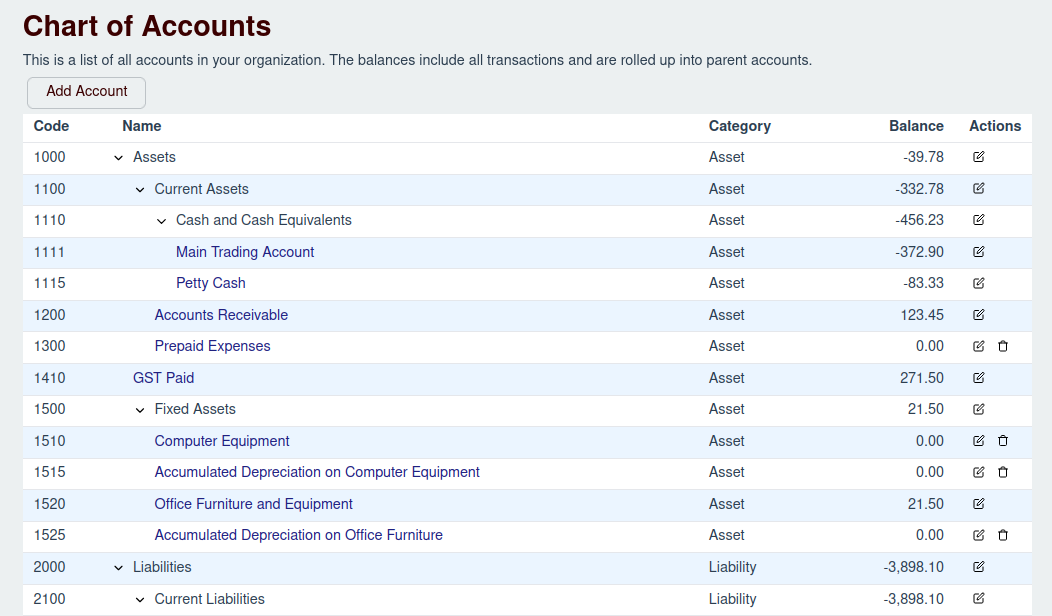
The main CoA screen provides a hierarchical view of your accounts, where balances from child accounts are rolled up into their parent accounts.
Main View
The table on this page displays all your accounts with the following columns:
- Code: A unique number or identifier for the account.
- Name: The descriptive name of the account.
- Category: The financial category the account belongs to (e.g., Asset, Liability, Revenue).
- Balance: The current financial balance of the account.
- Actions: A set of controls for managing the account.
Managing Accounts
You can manage your accounts directly from this screen.
Adding a New Account
To create a new account, click the Add Account button located at the top of the page.
- For detailed instructions, see the Add New Account page.
Editing an Existing Account
To modify an account's details (like its name or code), click the Edit button in the "Actions" column for that account row.
- For detailed instructions, see the Edit Account page.
Deleting an Account
To remove an account, click the Delete button in the "Actions" column. Please note that you can only delete accounts that have no transactions associated with them. This is a safety measure to prevent accidental data loss.
- For more information, see the Delete Account page.